
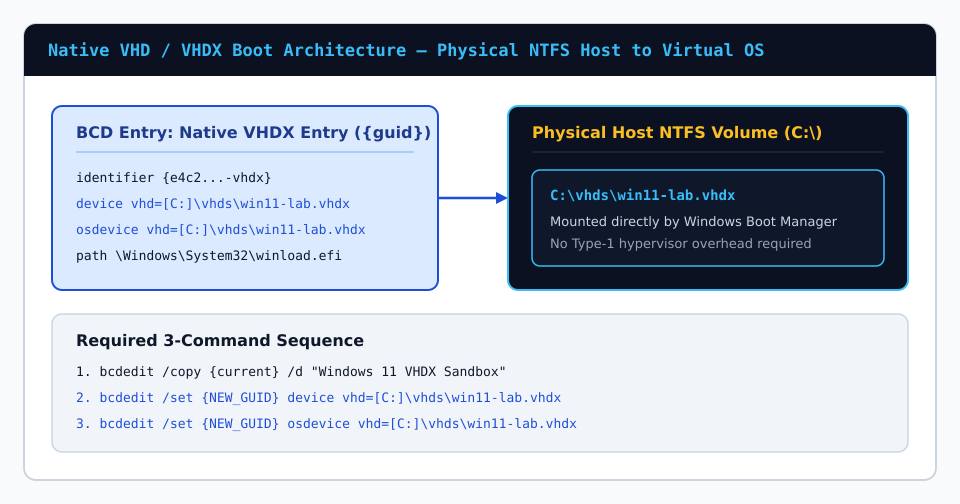
Native VHD/VHDX boot remains one of the cleanest engineering capabilities inside Windows Boot Manager (bootmgfw.efi). Instead of shrinking live NVMe partitions or dedicating separate physical drives for test builds, you can apply a clean Windows image onto a virtual hard disk file (.vhdx) residing inside a regular host folder and boot it directly on bare-metal CPU and GPU hardware.
1. Preparing the Host VHDX Image With diskpart & DISM
Before registering any BCD entry, allocate a fixed-size or dynamically expanding VHDX (fixed allocation avoids expansion fragmentation and ensures host free-space safety at boot). From an elevated terminal:
diskpart
create vdisk file=C:\vhds\win11-lab.vhdx maximum=61440 type=expandable
attach vdisk
convert gpt
create partition primary
format quick fs=ntfs label="Win11VHDX"
assign letter=V:
exit
Apply an OS image index from mounted ISO media using DISM onto volume V:, then inspect your live Windows host boot store before adding the entry.
2. Understanding Bracketed Host Volume Syntax (vhd=[C:]\vhds\...)
A common syntax error when writing raw bcdedit VHD entries manually is omitting square brackets around the host volume letter. Because Windows Boot Manager must distinguish the path inside the virtual disk from the physical partition holding the container file, the host drive is always bracketed:
bcdedit /export C:\bcd-backup.bak
bcdedit /copy {current} /d "Windows 11 Native VHDX"
bcdedit /set {NEW_GUID} device vhd=[C:]\vhds\win11-lab.vhdx
bcdedit /set {NEW_GUID} osdevice vhd=[C:]\vhds\win11-lab.vhdx
bcdedit /set {NEW_GUID} detecthal on
bcdedit /timeout 10
Alternative Automated Method Using bcdboot From Attached V:
If your VHDX is still attached at V: right after DISM image application, running bcdboot V:\Windows automatically detects the virtual disk backing file and generates the exact bracketed vhd=[C:]\vhds\win11-lab.vhdx device and osdevice attributes in one command, preserving UEFI EFI paths accurately.
3. Host Space Requirements & Licensing Caveats
- Full physical free space check: Dynamically expanding VHDX containers expand to their maximum declared size during Windows boot initialization; ensure the host NTFS drive holds enough unallocated bytes to cover full virtual capacity.
- Edition support: Native VHD boot is officially supported on Windows Pro, Enterprise, and Education editions (including Windows Server). Detach the VHDX inside
diskpart(detach vdisk) before rebooting so the running host does not leave a stale lock.