
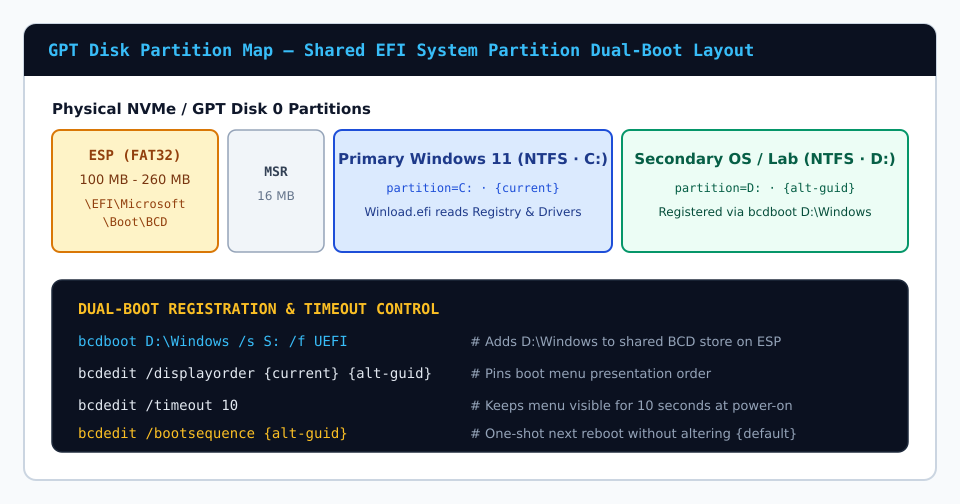
Cleanly dual-booting two Windows versions—such as keeping a validated Windows 10 production install on C: while evaluating Windows 11 24H2 or Windows Server on D:—requires zero third-party bootloader wrappers or MBR rewrites. When both operating systems live on GPT volumes connected to the system’s FAT32 EFI System Partition, inbox utilities register, label, and prioritize entries deterministically.
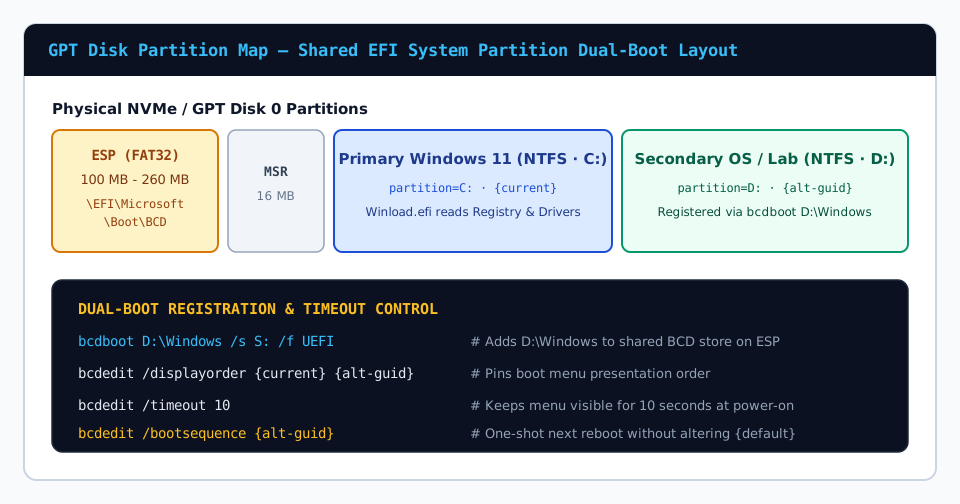
1. Registering the Secondary OS Volume Into the Active Store
Suppose your second Windows image has been deployed onto partition D:, leaving D:\Windows intact but missing from the Boot Manager menu. First snapshot your working BCD store, then let bcdboot append the second loader entry to your existing UEFI boot directory:
bcdedit /export C:\bcd-backup.bak
bcdboot D:\Windows
Running bcdboot D:\Windows without formatting arguments preserves existing loaders in \EFI\Microsoft\Boot\BCD while appending a properly signed loader entry for D: and automatically placing it first or in displayorder.
2. Customizing Labels, Default Target & Display Order
Because two installations both labeled Windows 11 are ambiguous at boot time, list all loaders with bcdedit /enum and stamp explicit labels onto each GUID:
bcdedit /set {current} description "Windows 11 Production (Primary NVMe)"
bcdedit /set {SECONDARY_GUID} description "Windows Lab / QA Sandbox (D:)"
bcdedit /default {current}
bcdedit /displayorder {current} {SECONDARY_GUID}
bcdedit /timeout 10
Choosing Metro Graphical Menu vs. Fast Legacy Text Menu
By default, Windows displays the touch-enabled graphical boot selector, which first boots partially into the default OS kernel before presenting choices—meaning selecting the secondary OS triggers a second quick reboot. Switching bootmenupolicy to Legacy renders the instant black-and-white text selection screen before any kernel loads, cutting boot-switching latency in half:
bcdedit /set {default} bootmenupolicy Legacy3. Retiring a Secondary OS Entry Cleanly
Once testing concludes and you format or repurpose partition D:, remove its stale entry without resetting NVRAM:
bcdedit /delete {SECONDARY_GUID}Verify with bcdedit /enum that only valid active loaders remain in {bootmgr} displayorder.